The Wi-Fi that can be switched off, in line with the Abeille law
PoE-Sea+ switches the Wi-Fi of each classroom on and off with a press on a wireless switch without battery. No change of the network, no subscription and no licence.
Already deployed in many French schools.
Ask for a loan of equipment What the law saysWhat the Abeille law asks of schools
PoE-Sea+ was designed for this requirement, and fits in the Wi-Fi reference framework of the Direction du numérique pour l'éducation (DNE).
- Primary schools: in the classrooms, the wireless access to the internet is switched off when it is not used for the digital teaching activities (article 7).
- Children under three: no wireless access point in the spaces dedicated to the reception, the rest and the activities of the children.
- School council: it is informed before any new wireless installation in a primary school.
- Pictogram: the places that offer a Wi-Fi access to the public show it at their entrance.
The teachers have nothing to unplug: a press on the switch is enough, and the Wi-Fi goes off by itself after the delay you choose.
Why manage the Wi-Fi of the school?
In most schools the Wi-Fi is on 24 hours a day, 365 days a year, even though the pupils use it a few hours a day.
Fewer radio waves in the classroom
The Wi-Fi is on for the digital activities only, and the access point is off the rest of the day, at night and on weekends.
Many parents and teachers want fewer radio waves in the classroom. With PoE-Sea the access point is really off, not only in standby: when the Wi-Fi is not used, it emits nothing.
Lower power consumption
An access point uses power day and night. A school is used about 1 300 of the 8 760 hours of the year.
PoE-Sea cuts the power of the access points the rest of the time: up to 85% less electricity for the wireless network, and less heat in the technical rooms.
Better security
A Wi-Fi network that is off cannot be attacked. Outside school hours, at night and on weekends, the school network is not reachable from the car park.
The switches can be locked, and every switching on is logged: you see when and where the Wi-Fi was used.
This is how PoE-Sea works
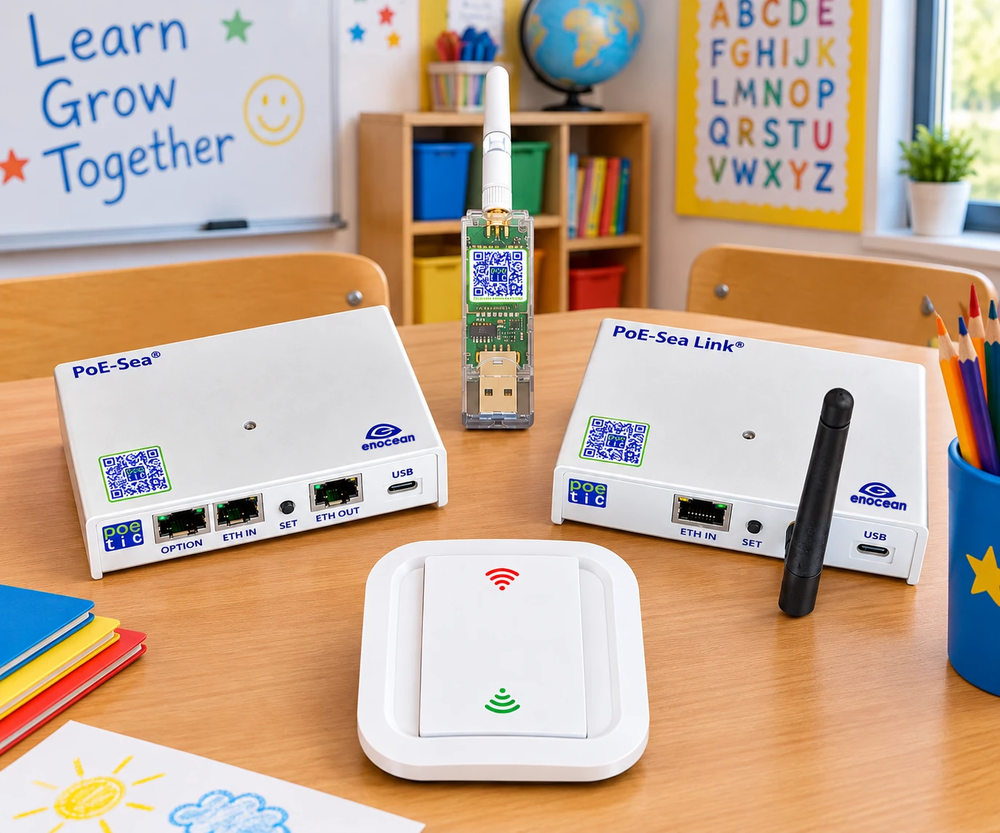
PoE-Sea works with the access points you already have, whatever the brand.
PoE-Sea+
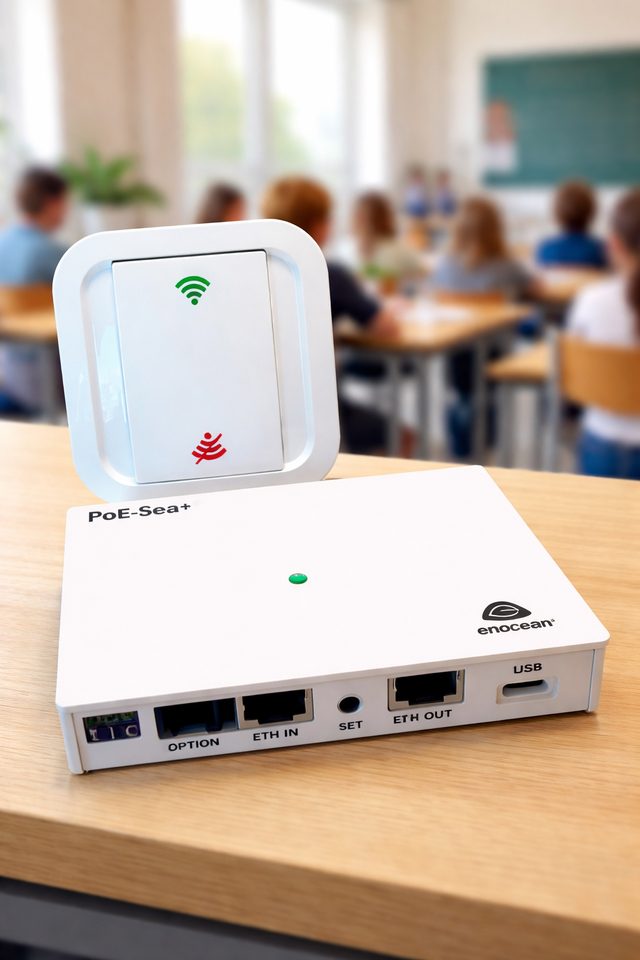
Installed between the PoE switch and the Wi-Fi access point. When it cuts the PoE power, the access point is off: no Wi-Fi, no radio waves and no power consumption.
Switch without battery
An EnOcean radio switch on the wall or on the desk of the teacher. It takes its energy from the press of the finger: no battery to change, no cable to pull.
PoE-Sea Link
The gateway connects the PoE-Sea+ of the building to the PoE-Sea cloud service, for the remote control, the schedules, the statistics and the software updates.
Schedule and locks
Each PoE-Sea+ follows its weekly schedule, also without internet: Wi-Fi off at the end of the day, switches locked during breaks, at night and on weekends.
The PoE-Sea network
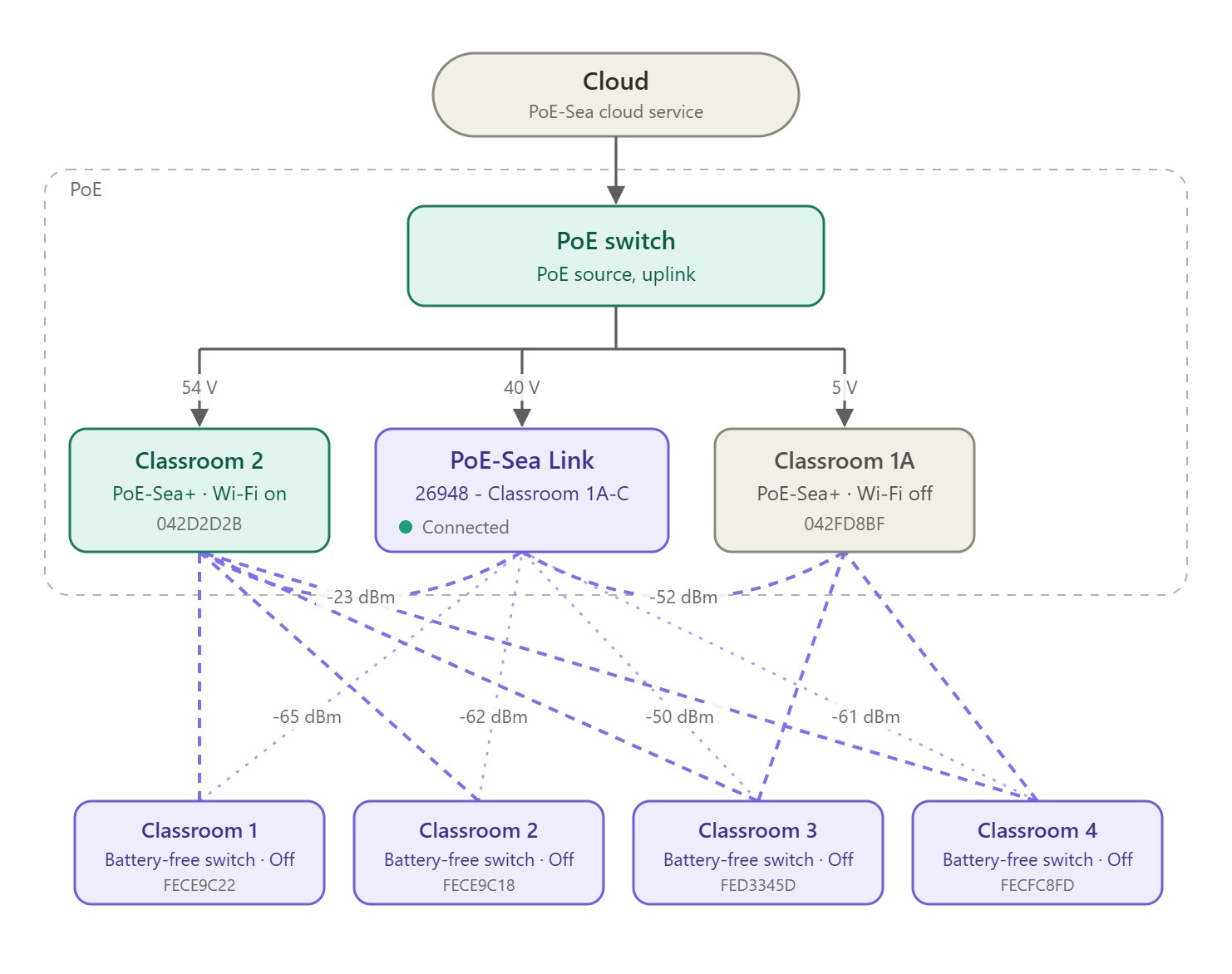
The PoE-Sea+ is placed between the PoE switch and the Wi-Fi access point of the classroom. The battery-free switch of the classroom sends its order by radio, and the PoE-Sea Link connects everything to the cloud service.
Technical sheet
- Compatible with all the Wi-Fi access points powered by PoE (802.3af, at and bt), whatever the brand, and also with IP cameras and IP phones.
- Placed between the PoE switch and the access point, it negotiates the power needed with the switch.
- When the Wi-Fi is off, the module asks the switch for less than 4 W (economy mode).
- Self-powered EnOcean switches with two buttons, on and off: no battery and no cable.
- Zones: when one access point covers several rooms, it only goes off when all the rooms are off, and any switch of the zone switches it back on.
- Built-in clock: night updates of the access points, and switches locked at night and on weekends.
- Settings with an EnOcean USB key and the PoE-Sea+ Master software; the switches are paired by scanning their QR code. Compatible with the earlier PoE-Sea.
- Bought once, without subscription or recurring licence.
A simple gesture for the teacher
- Press on: the access point of the classroom gets power, and the Wi-Fi is back as soon as it has started.
- Press off, or let the delay run out: the access point is switched off.
- Up to 8 switches per PoE-Sea+, for example one by the door and one on the desk of the teacher.
- A time quota can limit how long the Wi-Fi can be on.
- No new network, no new password: the pupils' devices connect as before.
One overview for all the schools of the municipality
The PoE-Sea cloud service shows every building, every PoE-Sea+ and every switch. Change a schedule, switch a classroom on or off, or follow the use of the Wi-Fi, from any browser.
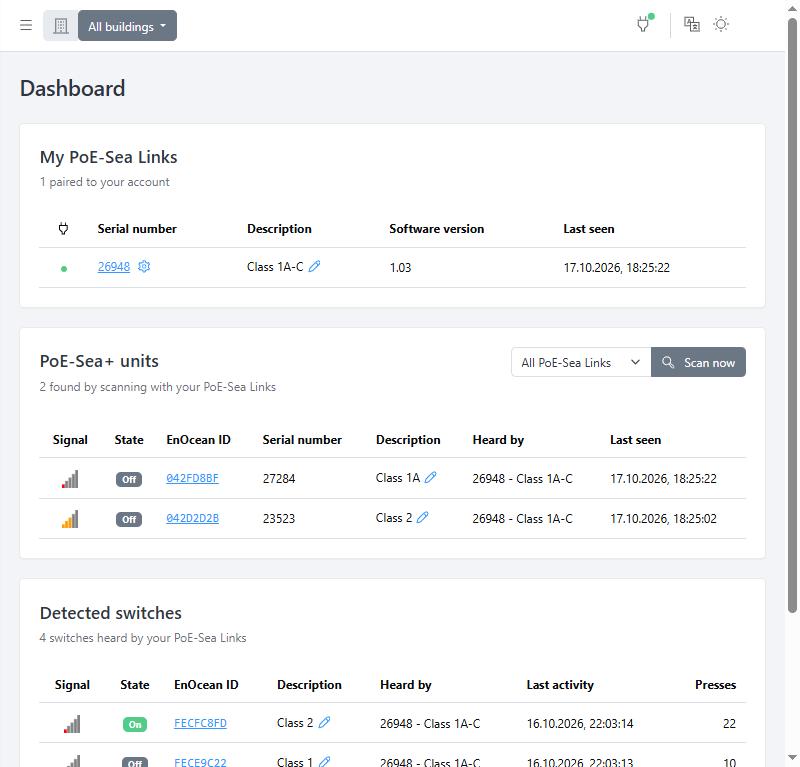
- Group the PoE-Sea+ by building, and filter all the views per school.
- Switch the Wi-Fi on or off remotely.
- Weekly schedules with up to 8 actions: on, off, lock or unlock the switches.
- Statistics and event log: activations, hours with Wi-Fi, the most used switches.
- Network map of each building, with the radio signal and the PoE voltage.
- User roles: read only, change the settings of the classrooms, or administer the buildings.
- Software updates of the PoE-Sea+ from the cloud service.
- In Norwegian, English, French and Dutch.
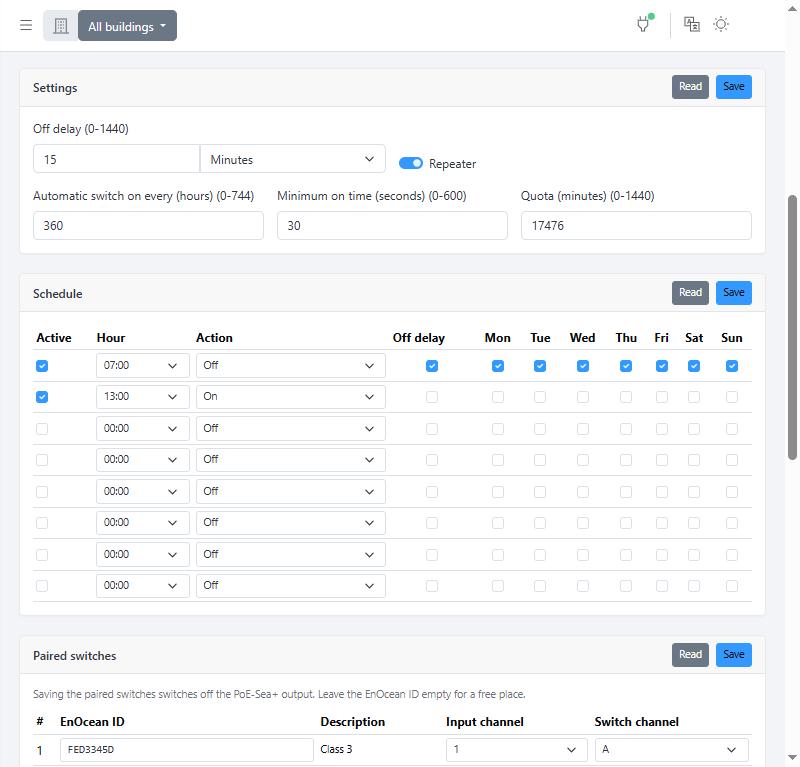
Delay before switching off, time quota and weekly schedule of a classroom.
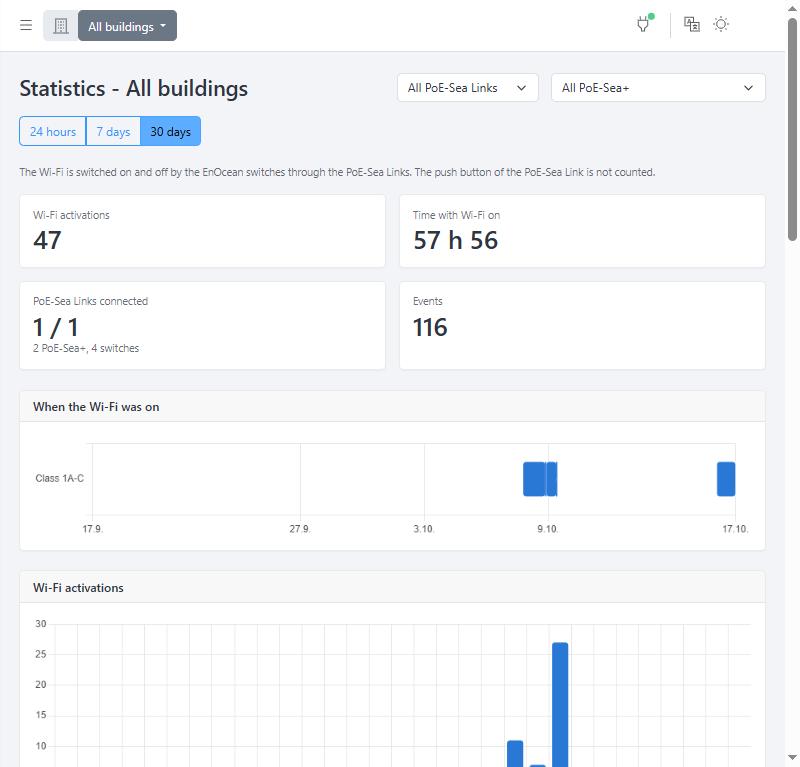
Activations and hours with Wi-Fi on, per day, for one school or for all.
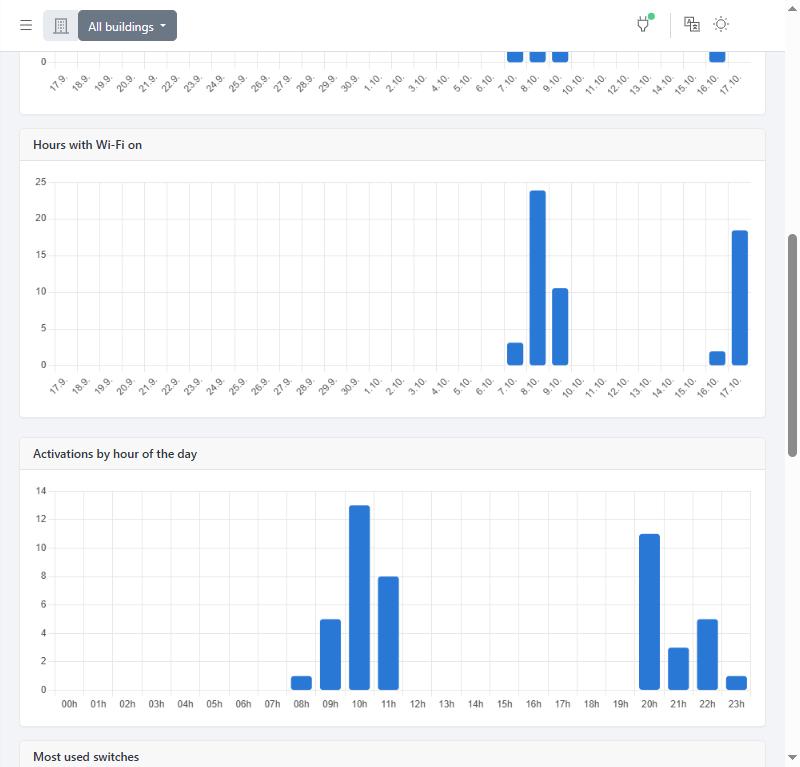
When is the Wi-Fi used? The activations per hour of the day reveal the use in the evening.
Network map
The network map draws the PoE-Sea Link, the PoE-Sea+ and the battery-free switches of a building. It shows which switch is heard by which PoE-Sea+, the strength of the radio signal and the PoE voltage of each device: a weak link or a missing voltage is found at a glance.
Wi-Fi when the pupils need it, not 24/7
up to 85% less electricity for the access points, when the Wi-Fi is only on during the school hours.
batteries in the switches: they are powered by the press of the finger.
cloud service for all the schools, with the statistics to document the use of the screens.
Beyond the Wi-Fi: a teaching aid
PoE-Sea+ can join an ecosystem of EnOcean sensors: CO2, temperature and energy consumption. The data of the classroom become graphs that the teachers use in their lessons about the ecological transition.
Sobriety becomes something the pupils can see and measure: the hours with Wi-Fi, the energy saved, the air of the classroom.
How to get equipped?
For large deployments, the integrators pass on the prices that PoE-Tic gives them.
Your network provider
Present PoE-Sea+ to the company that maintains your network: the installation does not change its configuration.
A reseller near you
No usual provider? PoE-Tic puts you in contact with a reseller or an integrator for a local service.
A test first
PoE-Tic lends you equipment for a technical validation (POC) in your school, before any deployment.
Would you like to try PoE-Sea in your school?
PoE-Tic lends you equipment for a technical validation, and puts you in contact with a reseller or an integrator near you.
Contact us Already a customer? Log in